
Vanced Manager APK:
Get More from YouTube Vanced With One App
If you’re searching for Vanced Manager APK, you probably want one simple thing: an easier way to set up YouTube Vanced without getting stuck on confusing steps. This app is basically a helper that keeps everything in one place, so you’re not hunting around for the right files or wondering what to install next. It’s made for people who just want a smoother YouTube experience and don’t want to waste time figuring out the technical stuff.
Once it’s set up, you can focus on watching instead of fixing. That’s the real appeal of Vanced Manager. It turns a messy install process into something that feels straightforward and manageable, even if you’re not “techy.”
Why Use Vanced Manager?
People use Vanced Manager because it saves effort and reduces mistakes. Instead of installing things manually and hoping you picked the right version, the manager guides you through the process and helps you keep your setup organized. It’s also useful when you need updates, because you can handle them without starting over from scratch.
Another big reason is convenience. Many users need MicroG to sign in and use features normally tied to Google services. Vanced Manager makes that part feel less intimidating because it’s handled in the same flow, not as a separate “figure it out yourself” step.
MicroG, Root, and Sideloading: What Do They Mean?
When you read about Vanced, you’ll often see three words that confuse people at first: MicroG, root, and sideloading. They sound technical, but the idea is simple.
MicroG is a small helper service that lets modified YouTube apps connect to your Google account. Without it, many users can’t sign in, sync subscriptions, or use features that require Google login. Some guides call it Vanced MicroG, but the purpose is the same: it helps the app act more like the official YouTube app when it comes to signing in. If you don’t care about logging in, you might not need it, but most people do because YouTube without your account feels empty.
Root is a deeper level of access on Android. A rooted phone can change system-level things that normal phones can’t. Rooting is not required for most users, but it can make certain installs smoother because the app can integrate more closely with the system. The downside is that rooting can be risky if you don’t know what you’re doing. It can also break banking apps, trigger security warnings, or cause issues after updates. That’s why most people stick with non-root methods.
Sideloading is the easiest of the three. It simply means installing an app from outside the Google Play Store. If you’ve ever downloaded an APK file and tapped “Install,” you’ve sideloaded. Android allows it, but you may need to turn on “Install unknown apps” for your browser or file manager. For tools like Vanced Manager or similar apps, sideloading is usually the normal way to install, because these apps are not typically available on Play Store.
How to Install and Use ReVanced Manager
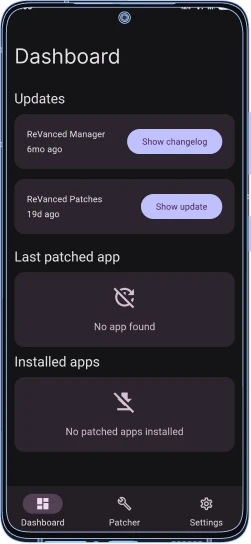
A lot of people now search for ReVanced Manager because they want a newer way to patch and install a modified YouTube experience. If you’re following a video guide, the steps are usually shown in a clear order, and that’s the best way to avoid mistakes. The key is to follow one tutorial from start to finish instead of mixing steps from different videos, because versions and menus can change. In most video tutorials, you’ll see the process broken down into three parts: installing the manager app, choosing what you want to patch (usually YouTube), and then installing the patched version. The manager handles the patching part for you, but you still need to pay attention to permissions and the download source, because using random files from unknown sites is where people run into problems. After installation, using it is straightforward. You open the manager, check for updates, and only change settings if you actually need to. Most users don’t need to touch advanced options. They just want the basics to work: a cleaner watching experience, fewer interruptions, and controls that feel more personal than the stock YouTube app.
How Vanced Manager Works
Vanced Manager works like a control center that helps you set up and manage a modified YouTube experience without doing everything manually. Instead of you searching for the right app version, downloading multiple files, and guessing the correct install order, the manager keeps the process organized and guided.
Here’s the basic idea of what it does behind the scenes. First, it helps you download the correct components you need. Then it walks you through installing them in the right order, so the main app and the login support (if you choose to use it) don’t clash. Once everything is installed, the manager stays useful because it can help you update, reinstall, or fix things later without starting from zero.
It also reduces common mistakes. A lot of people run into issues because they install the wrong version for their phone, skip a required step, or mix files from different sources. Using Vanced Manager makes the whole setup feel more like a normal app install: you follow a few prompts, grant the needed permissions, and you’re done.
The best part is that it keeps things simple. You don’t need to be a developer, and you don’t need to understand complicated Android terms to get it working. For most users, it’s just a smoother, more reliable way to install and maintain Vanced without the usual confusion.
Best Features of Vanced Manager APK
The main reason people look for Vanced Manager APK is not just to install an app once and forget it. They want a smoother setup, easy control, and features that make daily watching feel better. Instead of bouncing between different downloads and confusing steps, the manager keeps everything in one place and makes the whole experience feel less stressful. If you like YouTube but you’re tired of interruptions and limitations, these are the features that usually make people stick with it.
Install Different Vanced Apps
One of the most useful things is that you can install more than one option from the same place. Many users want both the main video app and YouTube Music Vanced, and they don’t want to search for separate files or worry about installing the wrong version. With Vanced Manager, you can pick what you need and install it without turning it into a long, messy process. It’s especially helpful for people who like having music and videos handled separately, but still want the same improved experience.
Play Videos in the Background
Background playback is one of those features that feels “normal” once you have it, and annoying when you don’t. It lets your video keep playing even when you lock your phone or switch to another app. People use it for podcasts, lectures, long interviews, or even music videos when they just want audio. If you’ve ever had YouTube stop the moment you open WhatsApp or turn your screen off, you already know why this matters.
SponsorBlock (Skip Sponsored Parts)
A lot of people don’t mind creators earning money, but sponsored segments can feel long and repetitive, especially when you’re watching multiple videos in a row. That’s why SponsorBlock is often mentioned with YouTube ReVanced APK. It can help skip sponsor messages and other non-main parts so you get to the point faster.
For users who watch tutorials or study content, this feels like relief. You stay focused, you don’t lose the flow, and the video feels more direct.
Fast Download and Easy Install
This is the part most people care about on day one. Instead of searching around for different files and hoping you picked the right one, the manager keeps the process simple and guided. You download what you need, tap install, and follow a few clear steps. For anyone who has ever dealt with broken links or confusing APK versions, this “quick and clean” setup is a big relief.
No Ads While Watching
Ads are the number one reason people look into Vanced tools in the first place. Watching a short video and getting hit with multiple ads can ruin the mood fast, especially when you’re just trying to relax or learn something. A Vanced-style setup is popular because it removes those interruptions and makes YouTube feel calmer and more watchable. It’s not just about saving time, it’s about keeping the experience smooth so you don’t feel constantly pulled out of the video.
Notifications and Settings You Can Change
A good experience is not only about removing problems, it’s also about making the app feel like it fits you. With more control over settings, you can adjust things the way you like, instead of being stuck with default behavior. Notifications are a great example. Some people want alerts for uploads, some only want them for certain channels, and some want fewer distractions overall. Having customization options helps you build a setup that matches how you actually use YouTube.
Built-In MicroG Support
A common frustration for new users is signing in. That’s where MicroG comes in. It helps the app connect with Google services so you can log in and use your account normally. When the manager supports it in the same flow, it feels less confusing, because you’re not hunting for separate downloads or trying random fixes from forums. For many people, this is the difference between “it works on my phone” and “I gave up.”
Extra Features in ReVanced-Style Mods
Some users go beyond the basic setup and want more advanced controls. That’s why you’ll often see people mention ReVanced. ReVanced-style mods are popular because they add extra tweaks and patch-style options that power users like. Not everyone needs those features, but if you enjoy fine-tuning your experience, these options can make the app feel more personal and more powerful, without changing the way you normally watch videos.
What You Need Before You Install Vanced Manager APK
Before installing any APK from outside the Play Store, it’s worth taking one minute to get your phone ready, because most “install failed” errors come from small, avoidable issues. Make sure your Android version is up to date, you have enough free storage, and your internet connection is stable so downloads don’t get corrupted halfway through. It’s also smart to think about safety first. Third-party APKs can be repackaged or tampered with, so only use sources you genuinely trust, and avoid any download page that tries to push extra “installer” apps or suspicious permissions. If something feels off, it usually is. A clean install should feel boring and normal, not like a fight with pop-ups.
Vanced Manager APK for PC or Mac
On its own, Vanced Manager is made for Android, so there isn’t a true “PC version” or “Mac version” in the normal sense. When people search for it on a desktop, what they usually mean is: “Can I run the Android app on my computer?” The honest answer is that it depends on how you plan to run Android apps on a desktop, and whether you’re okay with the extra setup and potential stability issues.
For most users, the simplest desktop experience is just using YouTube in a browser, because it’s fast and doesn’t require extra software. If someone still wants an Android-style experience on a computer, that’s usually where emulators come into the picture, but they can be heavy, and they’re not always smooth on older laptops.
How to Use Vanced Manager on PC
If you’re trying to use an Android-only app on a PC, the common approach is running it inside an Android emulator. In plain words, an emulator is a program that creates a virtual Android phone on your computer, so you can install and open APK files there like you would on a real device.
Just keep expectations realistic. Emulators can be slower than a real phone, they may crash on weak hardware, and they sometimes need extra permissions like virtualization support. If your goal is simply watching videos comfortably, the browser route is usually easier. If your goal is testing or learning, an emulator can make sense.
PC System Requirements
A decent emulator experience usually needs a 64-bit Windows or macOS setup, a modern CPU that supports virtualization, and enough RAM to keep everything from lagging. If your computer struggles with multitasking already, an emulator will feel frustrating because it adds an extra layer on top of your system.
As a general rule, more RAM and an SSD make the biggest difference. With limited memory or low storage, installs can fail, updates can break, and the whole thing can feel slow even when you’re doing everything “right.”
Vanced Manager APK Problems and Fixes
Most problems with Vanced-style installs happen for the same few reasons: the APK didn’t download cleanly, Android blocked the install, or the parts don’t match the phone. If the app won’t install at all, the first thing to check is Android’s “Install unknown apps” permission for the browser or file manager you used. If that permission is off, Android will keep stopping you even if the file is fine.
If the install starts but fails with a parsing error or “app not installed,” it’s usually a version mismatch or a bad download. Re-download the file from the same trusted source, make sure you’re not installing two different builds on top of each other, and restart your phone before trying again. That restart sounds basic, but it fixes a surprising number of weird install loops.
Login issues are another common headache. If you can’t sign in, it’s often because MicroG (or the MicroG variant used for these apps) isn’t installed correctly, is outdated, or is being blocked by battery optimization. Reinstalling MicroG, then opening it once before opening the YouTube app, fixes it for many people. If notifications don’t work, battery optimization and background restrictions are usually the reason, not the app itself. Android loves shutting down anything it doesn’t fully “trust,” especially on newer versions.
Advanced Setup: Root Installs, Magisk, and ABI/Signature Info
Advanced installs are where things can go from “easy” to “why is my phone doing this?” pretty fast. On rooted phones, some users prefer a system-level approach because it can integrate more cleanly with the device. Magisk is often part of that conversation because it’s a common tool for managing root and modules. The upside is a smoother integration in some setups, but the downside is that a small mistake can cause conflicts after updates or break the app in ways that are harder to diagnose. ABI is another detail that matters more than people expect. Your phone’s CPU architecture (like arm64 vs armeabi-v7a) decides which build will actually install and run. If you try the wrong one, you may get install errors or crashes that feel random. When people say “it works on my phone but not yours,” ABI mismatch is often the quiet reason. Then there’s signature and package conflicts. If you installed a different build before, Android might refuse the new one because it’s signed differently, even if it looks like the same app. In that case, you usually need to fully uninstall the old version first, then install the new one cleanly. This is also why mixing files from different sources or different “manager” flows can lead to frustrating dead ends.
Vanced Manager APK Pros and Cons
Vanced Manager APK can feel like a life-saver when you just want a better YouTube experience without spending an afternoon digging through confusing steps. But it’s not perfect, and it’s better to know both sides before you commit to it.
Pros | Cons |
|---|---|
Easy setup: Vanced Manager helps you install and manage the apps without doing everything manually. | Can break after updates: Sometimes YouTube or Android updates cause crashes or missing features. |
Saves time: Updates and re-installs are quicker because everything is in one place. | Download source matters: If you get the APK from a bad site, it can be unsafe. |
Cleaner watching experience: Fewer interruptions while watching videos. | Login issues happen: Sign-in can fail if MicroG isn’t set up right or gets restricted by Android. |
Useful extras: Features like background play and SponsorBlock can make YouTube feel smoother. | Not always stable on every device: Some phones behave differently, especially with newer Android versions. |
Good for beginners: Even if you’re new to APK installs, the steps feel more guided. | Root setups can be risky: Rooted installs can cause conflicts if you don’t follow the correct method. |
FAQs Vanced Manager APK
ConclusionVanced Manager APK
Vanced Manager APK is mainly popular because it makes the whole Vanced setup feel less confusing. If you’re someone who just wants a smoother YouTube experience without dealing with messy manual installs, a manager-style app can feel like the easiest path. It keeps the process organized, helps reduce common mistakes, and makes it simpler to reinstall or fix things when something goes wrong.
At the same time, it’s smart to be realistic. These apps can sometimes break after Android or YouTube updates, and the biggest safety risk is downloading from the wrong place. If you keep your setup clean, use trusted sources, and only update when needed, you’ll usually have a much better experience.